I have been doing extensive research into various weather and time of day systems for Unity.
I have a few options that I am looking at, but none of them do exactly what I need them to do.
I will need to do some extensive modifications no matter what system I end up using.
I have also fixed some long-standing bugs with the physics system that I am using to control the main player character. There was an issue with the character “sliding” on uneven surfaces, which I seem to have solved.
I have always had a great interest in multi-dimensional shapes. The idea that there could be a whole “dimension” of space that exists in dimensions beyond those that we can see is fascinating.
Human beings are used to seeing in three dimensions, length, breadth, and depth. In computer graphics these are generally labelled as X,Y, and Z.
However, there are an unlimited number of dimensions possible. Since humans only see the world in 3 dimensions, it is not possible to “create” a true 4 dimensional or higher object, but it is possible to create a representation of one of these shapes.
The secret is something called “Projection“. This is a mathematical means of mapping a higher dimensional structure onto a lower dimensional structure.
As a computer games programmer, I am very familiar with projection. Computer games, for now at least, are played on screens, which are two dimensional, while most games themselves, are three dimensional.
This means that it is necessary to do a “window to viewport transformation”. This basically “projects” the Z axis, or the depth information, onto the screen, while preserving the X and Y axis. This means that a 3D object can be drawn accurately onto a 2D screen.
The same technique works at higher dimensions. By fixing two axes, X and Y, in the same way as the 3D to 3D projection, and then projecting the other axes, (however many there are) it is possible to create a 2D representation of the higher dimensional shape.
These shapes look bizarre, especially when animated. This is because the way they are constructed and the way the move is completely unlike anything we are used to dealing with. We understand 3D objects, since we live in a 3D world. We also understand 2D objects, because 2D is a subset of 3D, but 4D objects seem to be “impossible”, even though they follow the same rules as other objects.
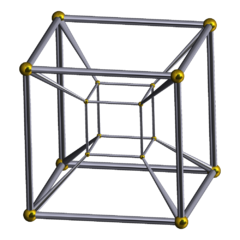
To demonstrate what a 4D object is, and how it is constructed, I constructed a “Tesseract” by following THIS tutorial. A tesseract is basically a cube in 4D.
First, here is a 1-Dimensional object, a simple line. containing only length information:
Then, a 2-Dimensional object, a square. Containing both length and width information:
Now there is a problem, because the screen is only two dimensions. So, how is it possible to represent a 3-dimensional shape, such as a cube, which contains depth information as well? The answer is simple, draw a representation of that cube:
This is not a true cube, but it can be essentially thought of as a “snapshot” of a cube at a given position and rotation. This idea of the “snapshot” will become important shortly. First, take a look at the tesseract, the 4-Dimensional cube:
This obviously looks very complex, but look closely, and you will see that it is essentially a series of interlocking cubes. Now, take a look at this image, which I obtained (HERE) from the wikipedia page on the tesseract:
Tesseract(Wikipedia)
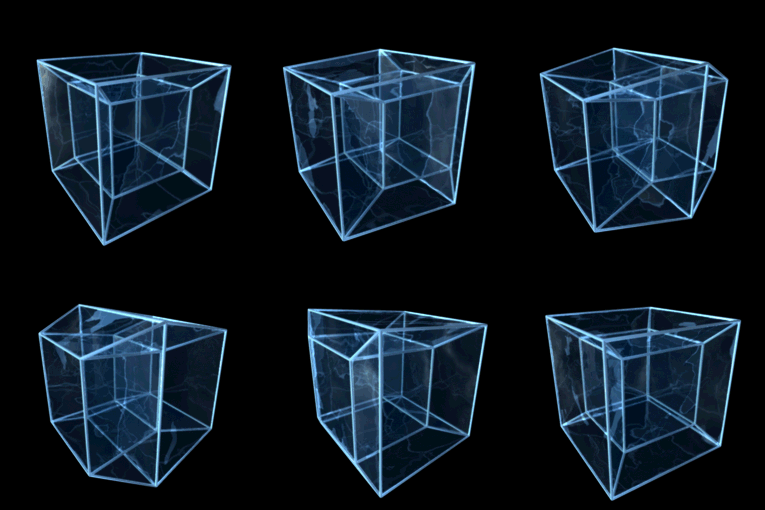
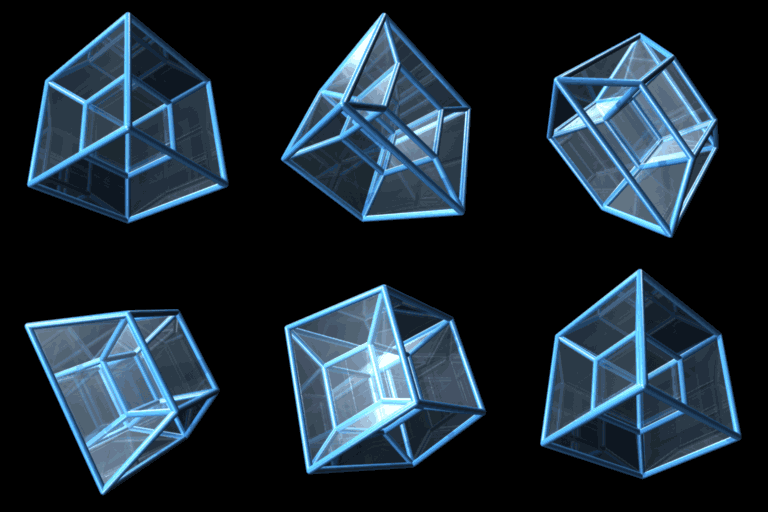
This is also a tesseract, but it looks completely different. Why? This is simply because the viewing angle and rotation is different, producing a vastly different projected shape. Wikipedia has two examples of rotating tesseracts. The first (left) shows rotation about one plane, and the second (right) shows rotation about two planes:
These animations look impossible, and seem to violate the rules of physics. Yet what is happening here is exactly the same as what would happen if a cube was rotated about one or two of it’s axes, the only difference is that another dimension is involved, and our brains can’t truly comprehend it.
I have toyed with the idea of writing either a program or a library (probably for Torque) that can render higher dimensional shapes. It would be very interesting to see what they look like when using the Oculus Rift, especially since the rift is a true 3D device, and therefore would only need a 4D to 3D projection, and not a 4D to 2D.
There is a game by the name of Miegakure (and another game or concept project which I played some time ago, I believe that it was called Daedalus) which created 4D game worlds. This lends itself well to complex reasoning and puzzle solving. It seems that with enough practice, human beings can in fact learn to “process” the fourth dimension, and make some sense of it.
I don’t know if a 4D first person shooter has ever been created, I doubt it, but it would definitely be a fascinating concept to develop.
This post is just a link to the complete TorqueScript console command reference. I have had to search for this a number of times, so I thought I would post it here for my own benefit, if for no other reason.
This is not the TDN version, but the main garagegames documentation version, so it should not require login.
This forums seems to have replaced the previous one, which had been having problems with spam for some time. The new forum is actively moderated and spam free, and seems to have taken over the brunt of the Torque related discussion from the previous forum.
I have made some small additions to the menu system for this project.
I had originally planned to allow the player to just rotate the celestial body currently in view, but I think to truly test the immersive VR capabilities of the Oculus Rift (something this project is designed to do) I really need to add a free look mode, which I have done.
The menu can now me hidden, leaving the screen completely free of all gui elements, and the user can move the camera around the scene with no restriction. I also added a reset button to reset the camera position if the user gets lost.
I am not sure whether I want to add realistic orbital mechanics, or other, more complex elements. It will depend on how much time I have.
This week I spent most of my time working on the level building tools for this project.
I have created a relatively complex object-based system, where each object contains a model file, a scale, a position, and various pieces of additional information.
The objects are then stored in a list, and elements of this list are selected and rendered depending on the players view direction. The system is relatively simple, but looks very good.
I have also added basic object manipulation, such as selection, as I previously mentioned, and user interaction, such as the ability to open doors. I have also added simple collision detection, walls, for example, are impassable, closed doors are also impassable, while open doors are not.
Players also have a simple inventory system, and I have created a simple onscreen gui and text prompt system to inform the player of game events.
I have included most of the elements now to create a basic game, except networking and sound. I have also not included animation support, but this would not be, strictly speaking, necessary.